NadouPro Creator Handbook: How to Become an AI Director?
1. How to make strong AI videos
1.1 From prompt thinking to director thinking
- Not recommended: prompt thinking — how do I “tame” the AI? A single-shot view
- Turn a vague or precise idea into an exhaustive prompt, hoping to recreate every shot in your head exactly.
- Example: “The cuts don’t join up. I’ll roll the dice a few more times.”
- Recommended: director thinking — how do I make an AI work feel powerful, respect the audience’s time, and have commercial value? A whole-film view
- Design a suitable AI production process. Refine narrative, pacing, camera movement, lighting, voice-over, music, and sound design. Watch progress and cost.
- Example: “Before rolling the dice, generate refined assets for characters, scenes, and props as whole-film references. Eastern fantasy, bright colors, less copper and black. Emotional conflicts must make sense. Reduce the share of extra subplots beyond the core pairing. 21 shots are hard to generate — budget them separately.”
1.2 How AI understands the world
“A girl is running on the beach. It’s very moving.”
This is how humans understand the world: when we read that sentence, the picture in our head is “blue sky, white clouds, sea, sand, a girl running with long strides, medium shot plus a slow pull-back.” Imagination “auto-completes the prompt.” If a creator sends that sentence to AI as-is, age, costume, beach environment, emotion, and camera language are likely all wrong — because AI understands the world another way: samples.
For AI, a character is a combination of features, a scene is a combination of visual features, a style is a statistical result of many samples, and a shot is a probability distribution in the training data. AI is better at understanding reference images, character sheets, style examples, and shot cases than relying on the idea in a creator’s head.
1.3 Why the audience believes it is the same story
A creator might break storyboards like this: “Shot 1, the girl runs. Shot 2, she stops and looks into the distance. Shot 3, she cries. Shot 4, she turns back and smiles.” Generate the four shots one by one. Each shot looks fine on its own. Together, they are all NG takes.
Because the audience watches a continuous video: the four shots should be the same person and the same sea. The weather cannot flip from sun to rain. The light should belong to the same time of day. The camera language should serve the same emotional expression. Otherwise the audience’s brain is interrupted again and again.
In strong film and TV work, a single shot taken out of context is not always stunning, but the relationship between shots is very clear. A single shot sets the floor of quality. Consistency decides the ceiling.
1.4 An industrial process for AI video
Many people think compute is the largest cost in AI creation. The largest cost is actually rework.
Live-action projects follow script — art design — storyboard — shoot — post. AI projects are the same. An AI director needs to set the world, design characters/scenes/style, produce a small number of key shots, and only then start large-scale AI production. As a commercial project scales, unified character design, scene assets, and shot standards often matter more than any single creator’s prompting skill.
2. The NadouPro production framework
2.1 Break an idea into shots
If you only have one spark of inspiration, create a project in Workbench, open the script, and write a short story that includes characters, a scene, and interaction. For example:
Emma walks alone beside a beach volleyball court on a midsummer evening. She hears laughter in the distance and does not move closer. A volleyball rolls to her feet. She stops, hesitates, then kicks it back gently. A teammate waves. She turns and smiles.
Auto-storyboard results are only a starting point. A better use is to treat them as a prompt material library, then keep revising picture content, shot size, camera movement, dialogue, or action.
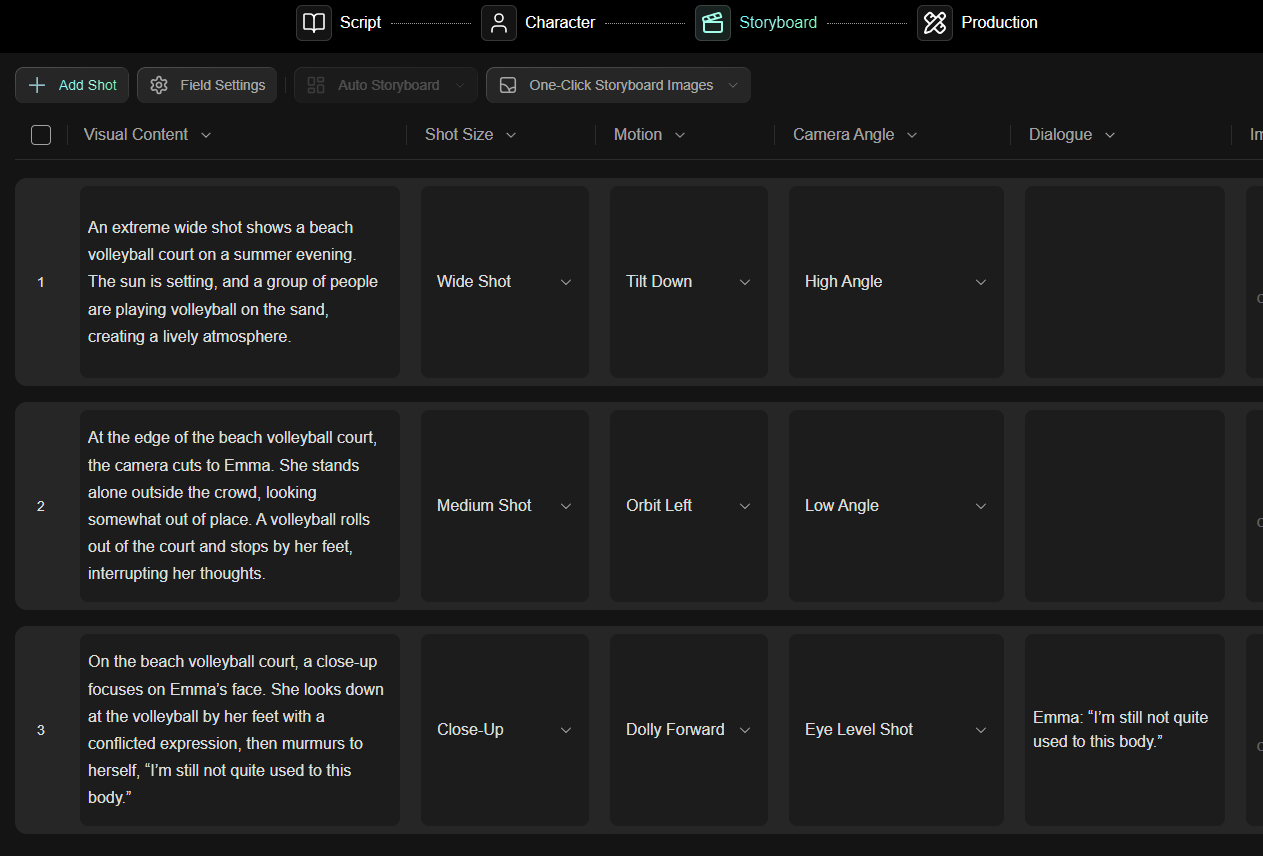
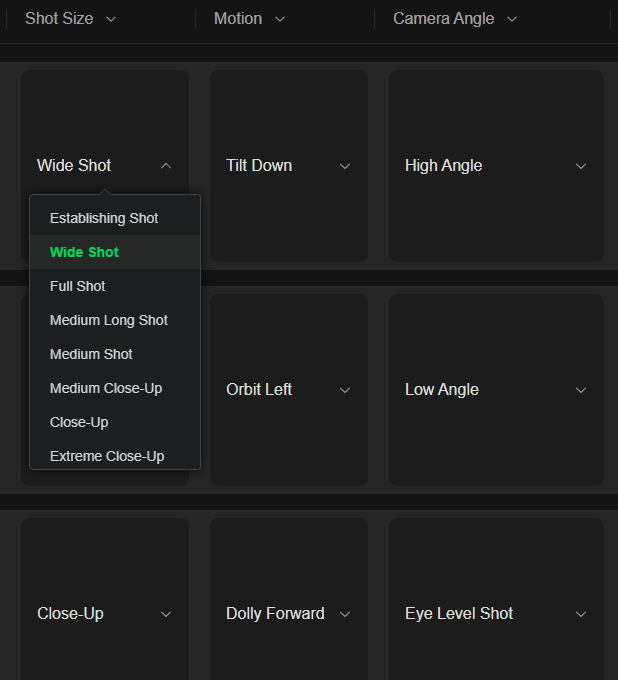
Drama scenes are about emotion: use close-ups with a faint slow push. Action scenes are about rhythm: use large camera moves and handheld breathing to fill the frame with on-set tension.
2.2 When to use Canvas vs Workbench
Canvas is more like an AI director’s desk. It is good for exploring, trying, comparing options, and showing upstream and downstream reference relationships among assets. Workbench is more like a project progress board. It is good for managing the script, subjects, storyboard order, and the production status of each shot in one place.
| Entry | Better for | How to use it in the Emma project |
|---|---|---|
| Canvas | Exploring, linking assets, comparing options, passing context downstream | First place the character description and beach-scene references, then generate an evening volleyball-court image and connect it to a video node |
| Workbench | Central management of script, subjects, storyboards, and production pages | Advance shot by shot, and record each shot’s prompt, generated result, and status |
2.3 Character assets: first let AI “know” Emma
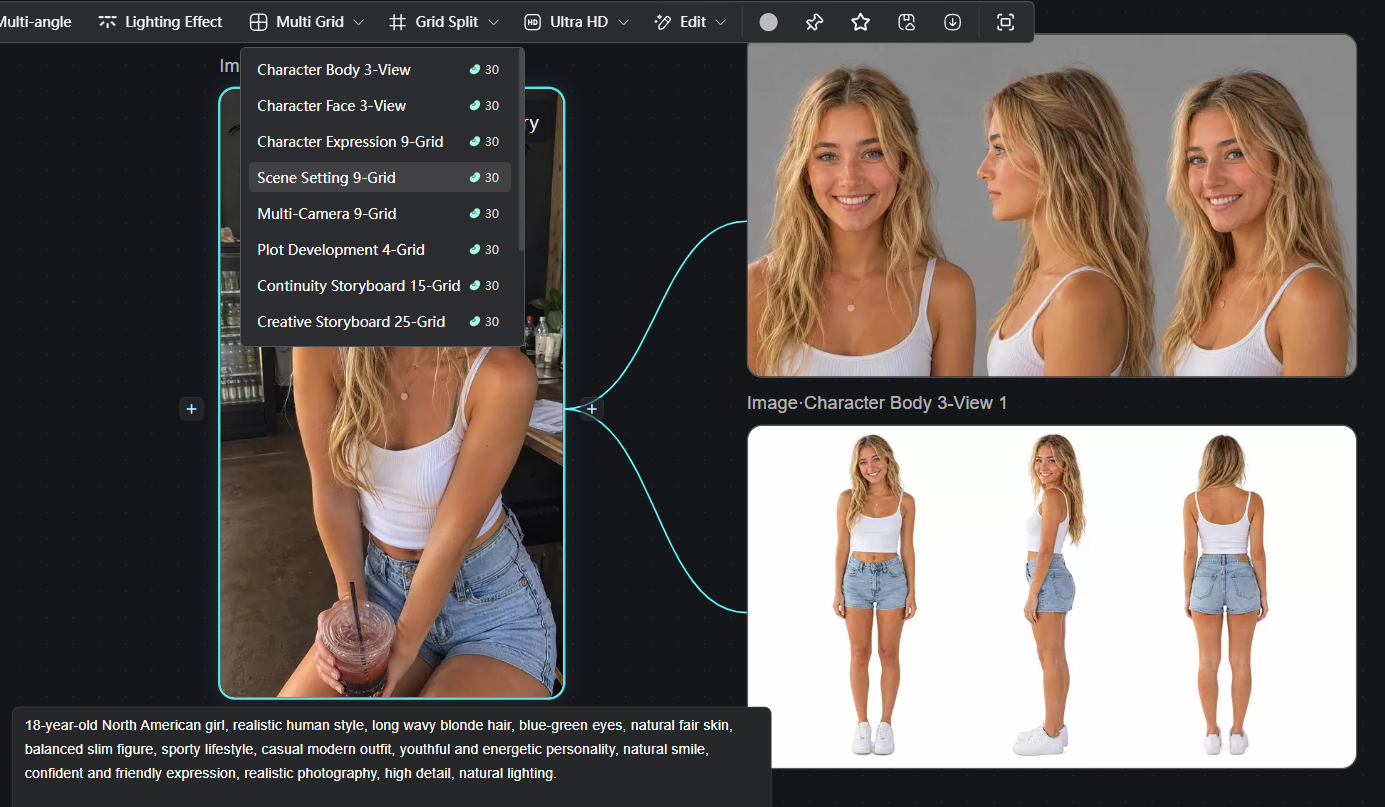
Emma cannot be only one prompt. A “character asset” needs to solve three things: face, body, and use.
- Face: a facial close-up, used to lock identity.
- Body: a full-body image or three-view, used to lock proportion, costume, height, and overall look.
- Use: every shot cites the same subject. Do not re-describe the character from scratch each time.
Prompt for the Emma subject: 18-year-old North American woman, photorealistic style, long slightly wavy blonde hair, clear blue-green eyes, natural skin tone, simple casual clothes, well-proportioned figure, youthful energy, fitness and outdoor habits, a natural smile, confident and bright.
2.4 Scene assets: lock the beach in place
“Beach” is too broad. The beach in the Emma project at least includes: Magic hour low-angle golden light, colored clouds, sand texture, a volleyball net, a distant crowd, wind direction, and the position of the wave line. If several of these change from shot to shot, the audience will feel the cuts do not join. Scene assets fix the world in place — reusable scene stills, video references, color references, and prop assets should all sit in a reusable location.
If the project has a complex space, use panorama generation. An ordinary image has only one viewpoint. A panorama can confirm the spatial relationship among the coastline, volleyball net, audience, and sun.
2.5 3D Director Stage: place relations first, beauty later
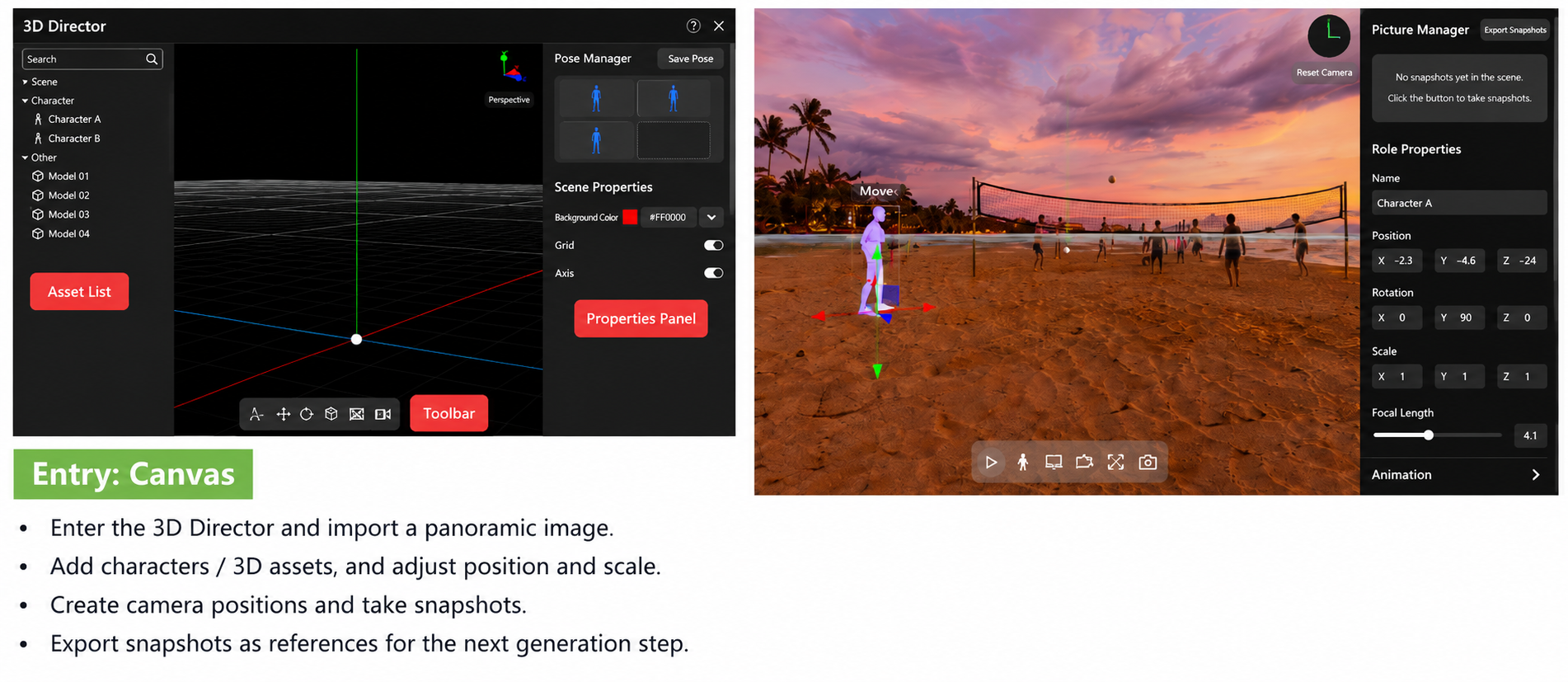
In complex interaction, AI may not know who stands where. 3D Director Stage is good for solving position and camera relationships: import a panorama, add characters or 3D assets, adjust position, scale, and facing, then create cameras, capture snapshots, and use those snapshots as reference images for the next generation.
Do not rush the final look at this stage. First get “who stands where, where the camera looks from, and which way the action moves” right. After the relationships are set, let AI fill in lighting and detail.
2.6 Cinematic quality: light, color, and camera parameters
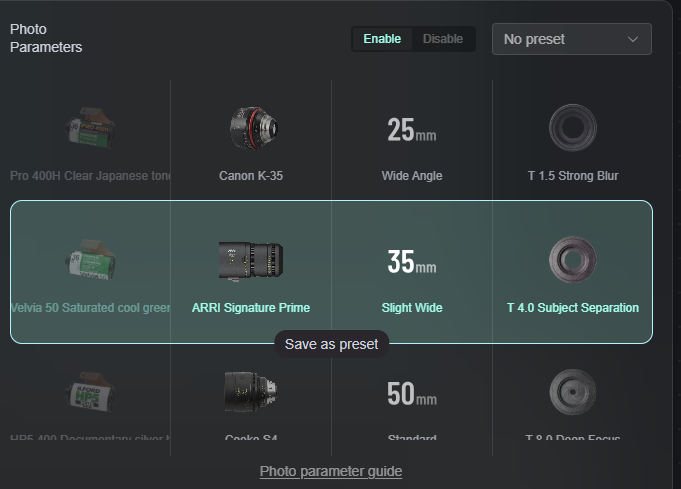
Sometimes a frame “doesn’t look good enough,” and you do not necessarily need to rewrite the prompt. If the light is inconsistent, use relighting. If the color drifts, use color cards. If the lens feel is wrong, use photo parameters. Focal length, depth of field, angle of view, and image quality all affect whether the audience reads the result as cinematic.
In a multi-shot project, regenerating again and again only creates more uncertainty. Break the problem into light, color, composition, focal length, and subject, then choose the right tool.
3. Write high-quality prompts
A prompt is not the creation itself. It is how you translate director intent for AI.
3.1 Five dimensions of director intent
Formula: AI video prompt = subject + scene + action + camera + style
Example: “A young girl in simple casual clothes is running on a summer beach, her long hair moving in the sea wind, medium tracking shot, Hayao Miyazaki animation style.”
- The subject is the core of the frame. The clearer the subject, the easier it is for AI to understand.
- The scene decides spatial information. The more specific the scene, the easier it is to keep consistency.
- Action decides how the frame changes.
- Camera decides what the audience sees, for example close-up, tracking shot, push-in, pull-back, aerial.
- Style decides the work’s temperament, for example Miyazaki animation, Makoto Shinkai animation, cinematic realism, Chinese-fantasy, cyberpunk.
3.2 Common mistakes
Mistake 1: Writing the prompt like a novel. Hundreds or even thousands of words, with information that conflicts. Prioritize clarity, not more words.
Mistake 2: Writing the prompt like a screenplay, or treating an (AI-written) screenplay as a prompt. Break it into shots, keep consistency, and generate shot by shot.
Mistake 3: Using only big words. For example: cinematic, stunning, epic, blockbuster quality, advanced camera moves, emotion maxed out. These are more like evaluation criteria than production instructions. Write subject + scene + action + camera + style directly.
Mistake 4: An 8-second shot prompt carries a minute of information. Around 4 seconds suits character or prop close-ups and forceful action. Around 8 seconds suits dialogue, character movement, and emotional turns. A 15-second shot suits continuous action that can actually finish in that duration in real life.
Mistake 5: Trying to solve every problem in one generation. Solve one problem per generation. Stabilize character and scene first, then optimize camera movement in the next roll. Lip sync and voice-over are usually handled separately after a rough cut of the whole film.
3.3 Generation tips
- Use reference images and reference videos instead of text. “Match the color of @image 1” may work better than a hundred-word prompt.
- The more important the information, the earlier it should appear in the references. For example, in a close-up video, order a frontal character close-up, a depth-of-field reference video, a color reference image, then a scene reference image.
- Production order: generate character, prop, and scene assets — use those assets as prompt references — generate keyframes (first and last frames) — generate the shot — extend forward or backward, or generate the next shot.
- Use motion capture, performance transfer, 3D models, and other supporting tools to produce more accurate reference images or videos.
4. Teams and scaled production
In traditional AI creation, projects are scattered across platforms, assets pile up and are hard to sort, and files are downloaded and re-uploaded again and again. Material management is expensive, and a small slip can lose core files. That collaboration chaos not only hurts team efficiency, it also threatens schedule and overall cost.
Moving from a solo AI director to a professional AI film team, scaled production depends on industrial team collaboration. From asset management to production collaboration, every step needs a standard, efficient, controllable workflow.
4.1 Team projects need orderly asset management
Who has the character image, which file is the scene reference, why the last version of the video was rejected, which prompt can be reused — if all of that lives in chat history, efficiency suffers.
NadouPro WorkSpace builds a shared workspace as clear as a cloud drive. Materials, parameters, and assets all live online, and team members can sort, copy, and cite them in real time.
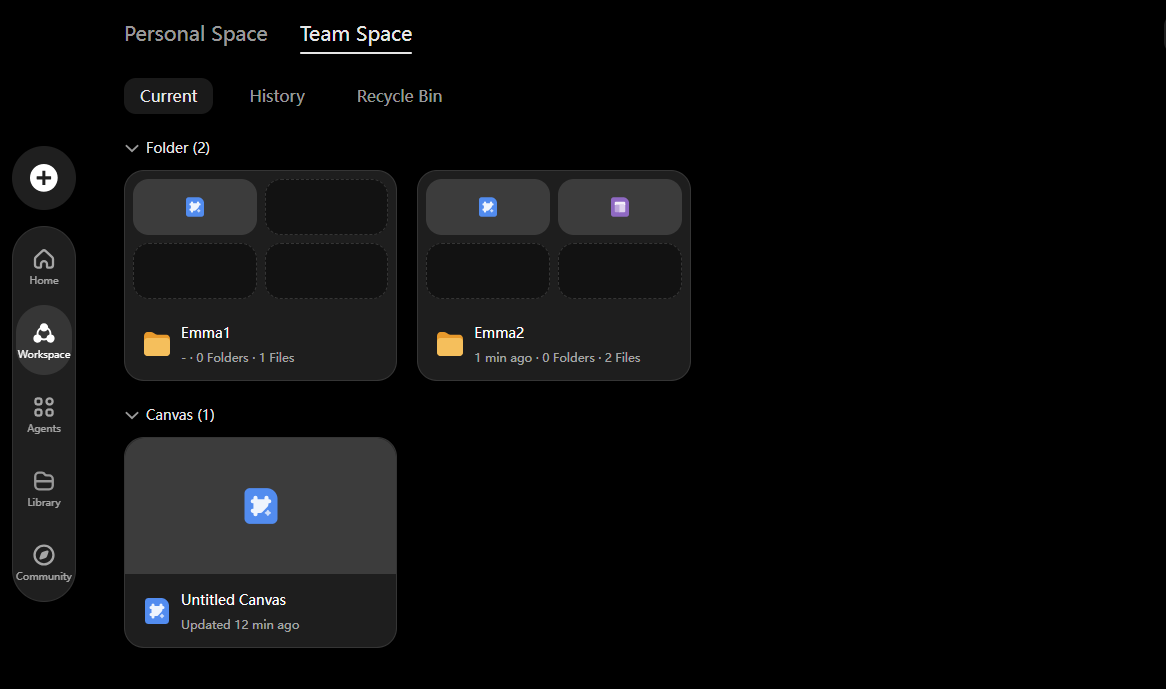
A team space should at least include:
- Characters: Emma subject, face references, full-body look, expressions, and motion.
- Scenes: Magic hour beach volleyball court, volleyball net, colored clouds, coastline, audience positions.
- Shots: auto-storyboard results, human-revised storyboards, and each shot’s prompt and reference images.
- Process: Canvas nodes, Workbench production records, reusable parameters, rejected versions and reasons.
- Delivery: rough cut, fine cut, voice-over, music, subtitles, and the final export.
4.2 Online collaboration
Traditional AI creation is often island work. NadouPro supports multi-user real-time collaboration. In Workbench and Canvas, core team members can edit the same project, review footage in the shared workspace, hand off revisions, and clone highlight parameters in one click.
For the Emma project, decide who makes the call, who owns assets, who generates, and who edits and delivers. All of these roles can join a NadouPro team space and collaborate without friction.
| Role | What they mainly watch | Deliverable |
|---|---|---|
| Director / creative lead | Story, emotion, shot order, whether a take breaks character | Storyboard sheet, notes, picture-lock judgment |
| Asset owner | Whether Emma, the beach scene, volleyball, and teammate references stay consistent | Subject library, scene library, material library |
| Generation operator | Whether each shot is generated from assets and prompts, and whether parameters are recorded | Candidate videos, keyframes, generation records |
| Editorial / post | Shot order, sound, pacing, subtitles, final export | Rough cut, fine cut, delivery version |
4.3 Set project permissions for team members
NadouPro has three member permission types: creator or admin, editor, and viewer. Admins own space structure and project management. Editors do the actual production and edits. Viewers are a fit for review, clients, or people who only need progress.
4.4 Project progress management
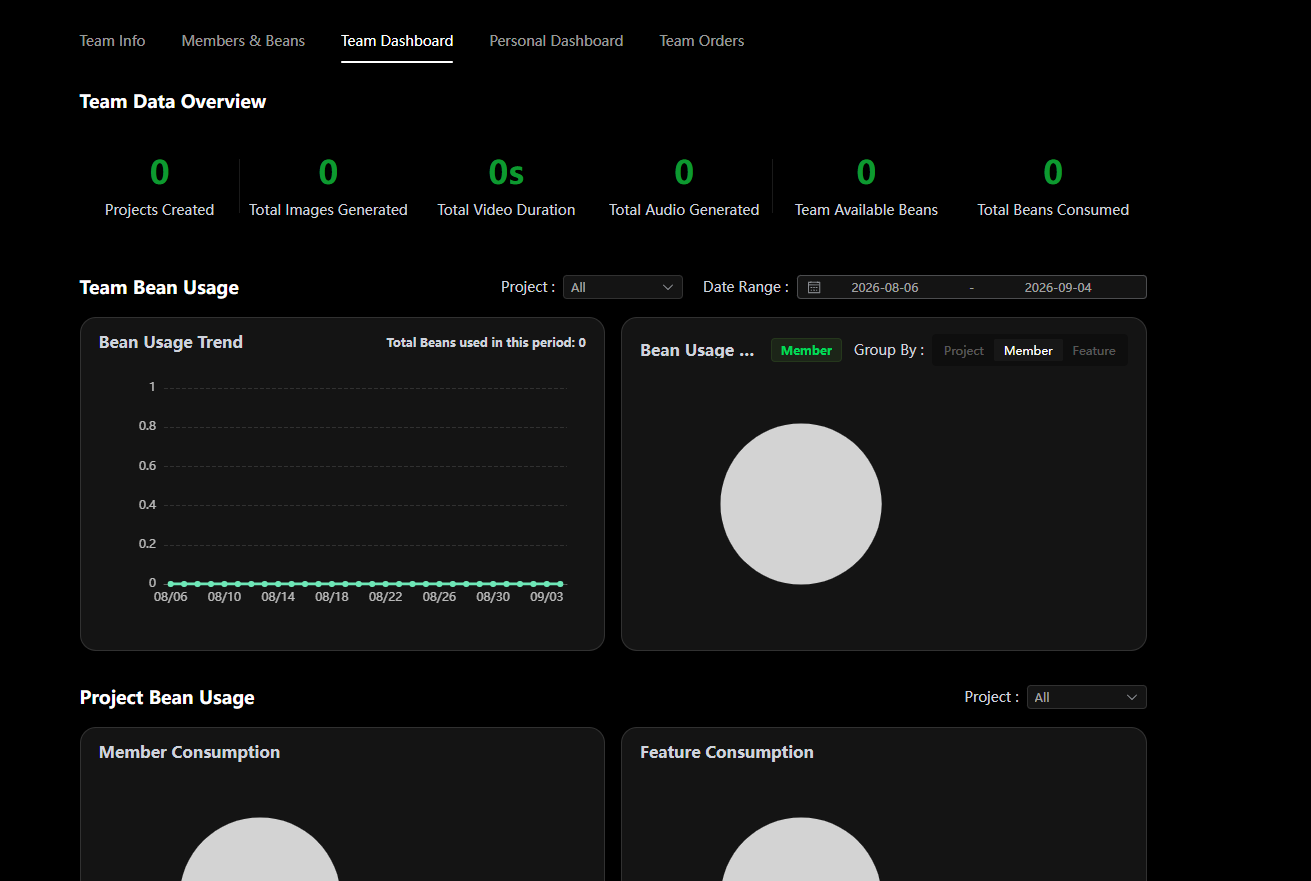
For a producer, cost control and efficiency measurement come first. NadouPro provides a clear team data dashboard: who made how many assets, how much compute was consumed, and the whole project at a glance. Producers can monitor cost and member output, allocate compute scientifically, and use digital management to control budget and schedule.