
Tools to reference film and TV shots when creating AI short films
Tools to reference film and TV shots when creating AI short films
This time, on the NadouPro canvas, I used an original fictional scene to reference film-shot composition methods: first create a staging image, then produce a 5-second short video. The estimated costs before submission for the image and the video were 3 and 7 credits respectively, totaling 10 credits; actual charges are subject to platform records. Below I will first address tool selection, then show the canvas and sample, and explain what this trial can verify.
If you want to find film or TV shots as references, start with ShotDeck and NadouPro. ShotDeck is good for finding and organizing still frames; to analyze a video segment, you can learn about NadouPro’s shot-analysis agent and then convert the analysis results into your own prompts and storyboards. Finding images and understanding motion are two separate steps, so you can choose tools for each.
The following is organized by use case and is not a ranked hands-on test. Feature information was verified on October 29, 2026; available entry points and fees are subject to the current product documentation.
Practical case: validating compositional references using an original doorway-frame shot
I turned the task “foreground door frame creates a picture-within-a-picture, character pauses before entering” into an original shot task, first generating a dusk staging image of an old bookstore, then using that image as a reference to generate a short video. The three nodes in the canvas—text, image, and video—and their connections are all reviewable.
Open the NadouPro example canvas, and examine the task card, staging image, and the connections to the short video.
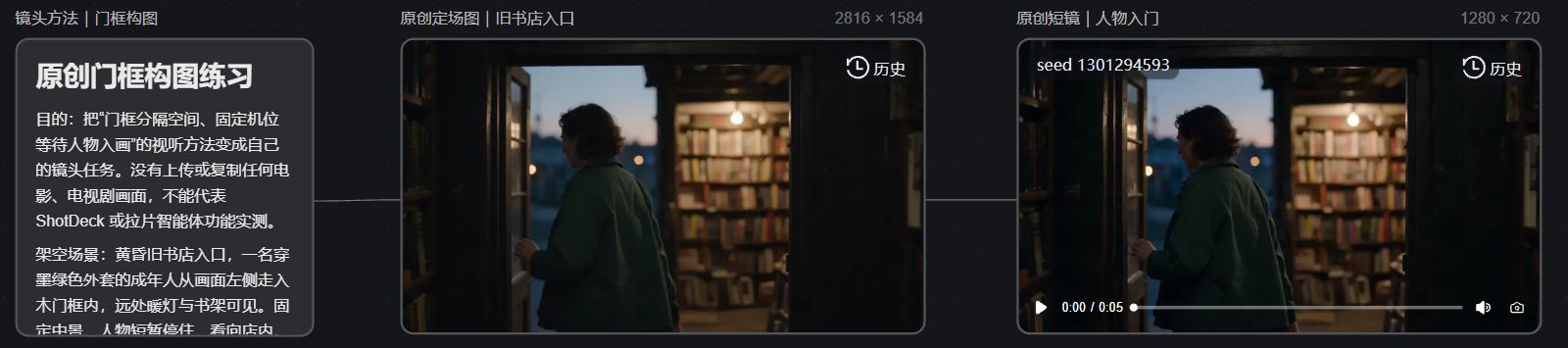
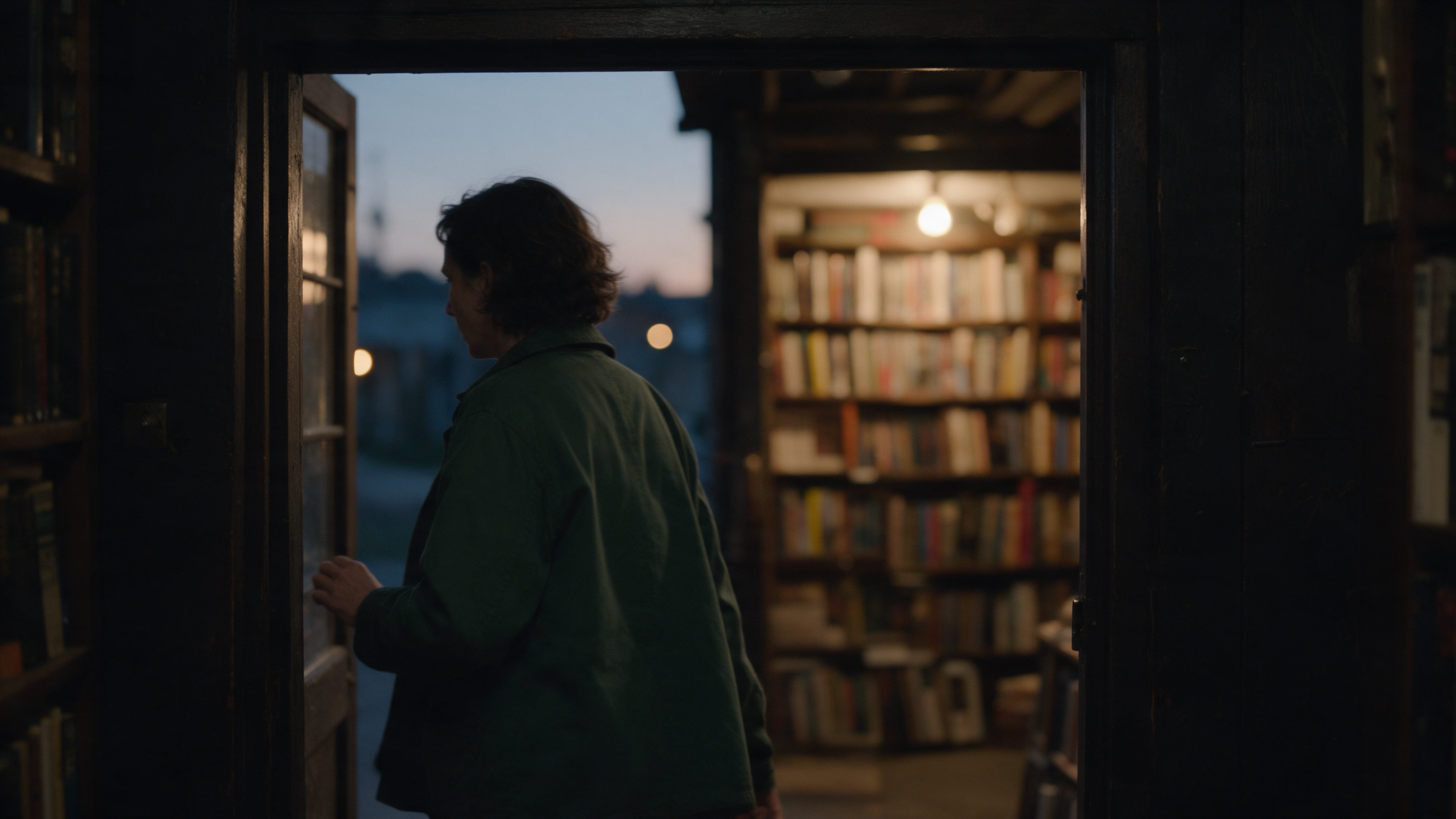
The image retains the door frame, warm-lit bookshelves, and the blue-gray dusk; the short video is used to check whether the spatial relationship between the door frame and the character remains clear when the character enters the frame.
Verification scope: This example did not upload original film footage and did not conduct a live test of ShotDeck searches or the shot-analysis agent; it only demonstrates converting a compositional method into an original shot and completing one image-to-video generation. For this trial I used Seedream 5.0 Pro to generate a 16:9, 2K image, then used Seedance 2.0 Mini to produce a 5-second, 720p, silent video; the estimated costs before submission were 3 and 7 credits respectively, and actual charges are subject to platform records.
First, what each of the two tools addresses
Tool or capability | Verifiable uses | Notes when using |
|---|---|---|
ShotDeck | Search film images, find by tags such as composition, lighting, and color, and build and share reference collections | Stills alone cannot explain camera movement and editing rhythm |
NadouPro shot-analysis agent | Upload video to generate analysis reports that include shot lists, scripts, and audiovisual techniques | Analysis should be checked against the original footage |
NadouPro cinematic prompts | Help optimize input descriptions | Cannot be assumed to understand all creative constraints |
Sources: ShotDeck official website, NadouPro agents guide. The original text’s mentions of “broad material search” scope, licensing range, and methods of dragging into the canvas were not fully verifiable from publicly available information for this article and are not assumed as operational prerequisites.
Before searching, decide what you want to learn
Don’t rush to search for “like a certain film.” Think about what actually attracts you: is it the character standing at the edge, the door frame separating spaces, or the camera waiting a moment before moving? Narrowing the question makes the references you find easier to apply to your own shots.
If you want to learn composition and color, start with still frames; if you want to learn camera movement, pauses, and reaction shots, you need to return to full clips you have rights to access. A single screenshot cannot tell you where the camera was before, nor why a character stopped.
When saving a reference, write a brief note on why you chose it, for example, "the door frame makes the character feel constrained." When a colleague opens it later, they’ll know where to look. If another reference has a completely different lighting direction, also note which part you are borrowing so the set of images doesn’t contradict itself.
Break references into your own shot tasks
Below is a fictional transcription example and does not correspond to any actual film:
Observed technique | Use in the new story |
|---|---|
Character placed at the edge of the frame | Convey their alienation from the environment |
Fixed camera position waiting for the character to enter | Let the audience notice the space first, then see the action |
Leave a pause before answering | Portray the character’s hesitation |
Then write the task with your own characters and setting: the character enters the shop door, stops within the door frame, and looks toward the counter. Medium shot, fixed camera position, retain the pause. Here only the audiovisual organizational methods are borrowed, not the original film’s characters, dialogue, or soundtrack.
You can hand the description to a prompt tool for organization, then read it back once it's organized. Remove extra characters, plot elements, or camera moves you don’t need; lengthening a sentence doesn’t necessarily make it closer to the shot you originally wanted to shoot.
When integrating generation, separate the reference purposes
Character images explain costume and appearance, scene images explain the environment, and film references are used to discuss compositional and lighting intent. If you plan to upload third-party images to a generative tool, separately verify whether you have the corresponding usage rights; do not interpret “viewable” as “freely uploadable and reusable.”
Start with a key shot and check whether your story is being told clearly. If the result deviates, determine whether the wrong references were chosen, descriptions conflicted, or the action itself was not executed well, then adjust the corresponding part. A similar style cannot compensate for errors in character or spatial relationships.
Finding references does not equal obtaining rights to use the original footage
Reference library subscriptions and generation credits do not automatically authorize you to edit in original footage, reuse lines, or reuse audio, nor do they guarantee that generated results can be used in any commercial project. Materials, tools, and final publishing uses should each be verified separately.
Before delivery, place your references and your own storyboard together and explain which method was borrowed and how it serves the new story. If you can only say “it looks like the original” but cannot explain what the shot’s function is in that film, go back and redesign the story first.