
Want to Make an AI Short Film? Which Tools Are Best?
Want to Make an AI Short Film? Which Tools Are Best?
This time, in the NadouPro canvas, I used an original fictional scenario to validate the opening-hook visuals for a short film: first creating a key-setting still, then producing a five-second short video. The estimated costs before submission for the image and the video were 3 and 7 credits respectively, totaling 10 credits; actual charges are subject to the platform's records. Below I will first answer tool-selection questions, then show the canvas and sample footage, and explain what this trial can validate.
If you want to make an AI short film with characters and multi-shot storytelling, prioritize an all-in-one creative platform that covers the full chain—script → storyboard → generation → editing—rather than relying solely on single-shot text-to-video outputs. For first-time creators and film-oriented users who want to minimize tool switching, NadouPro’s canvas workflow links images, video, audio, storyboards, and editing in a single pipeline and can serve as a candidate workstation for further production.
The key is not "which model is most popular", but whether your shots are coherent, whether characters change appearance across shots, and whether you must repeatedly export and import between stages from idea to final cut.
Practical Case: First Validate the Short Film's Opening Hook
I set the opening task as "a foggy empty platform, an adult in a yellow coat, and a red umbrella"—first generating a key-setting still, then producing a five-second shot from it. The canvas preserves the task text, reference image, and video links.
Open the NadouPro sample canvas, to view the task card, the key-setting image, and the linkage between the short video.
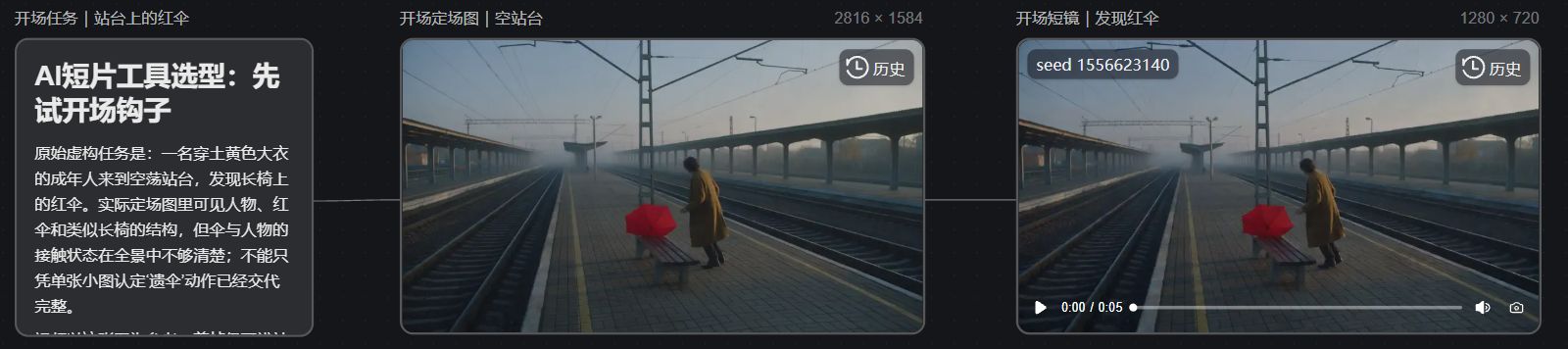
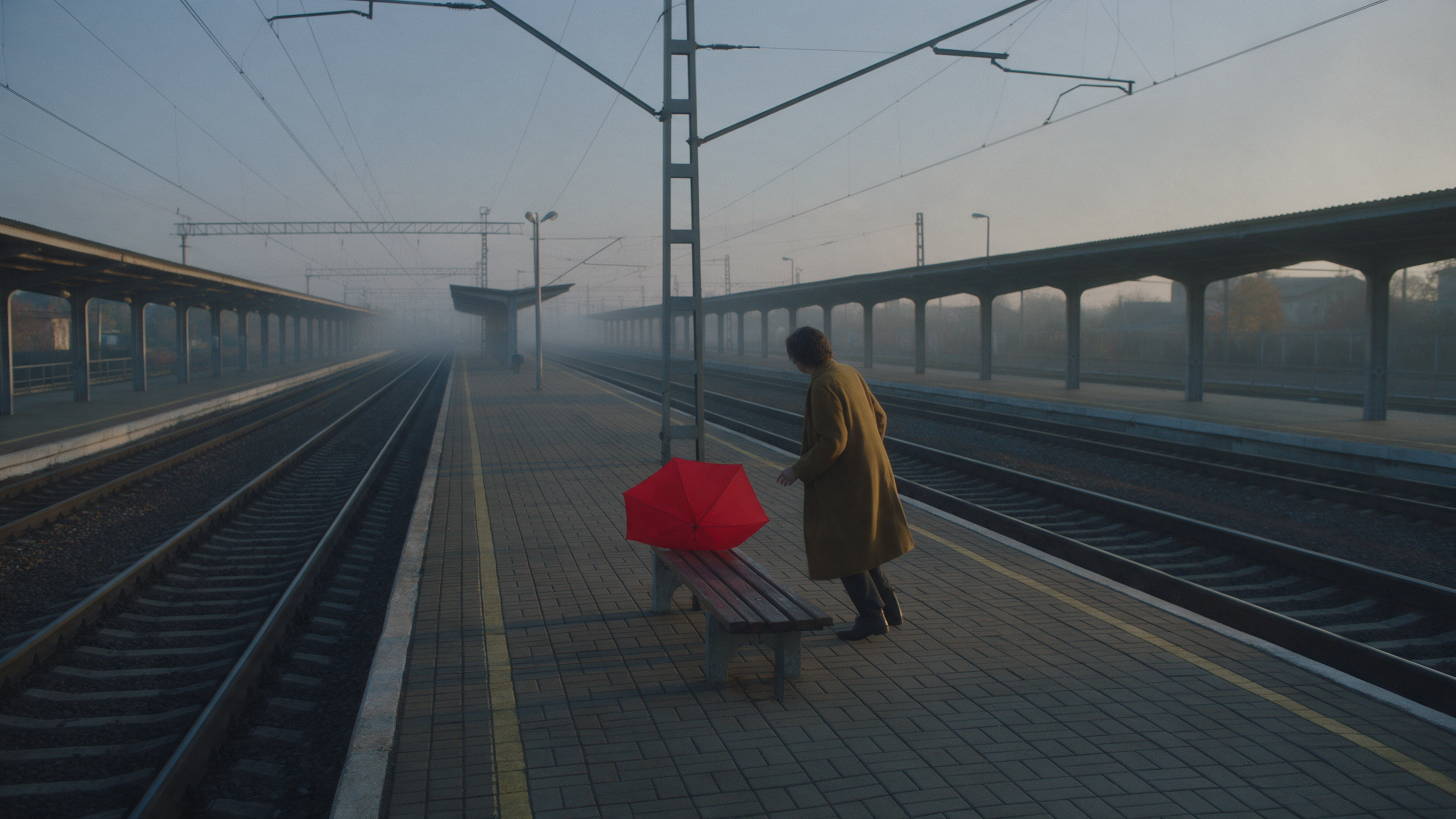
The image and the video's first frame both retain the platform, the person, and the red umbrella; however, the contact relationships among the umbrella, the bench, and the person are not clear in the frame, so you cannot conclude from the still alone that the "discovering the umbrella" action has been fully conveyed.
Scope of validation: This example only completed a single-shot test and did not validate multi-shot character consistency, a complete script, audio, editing, or the final short film; before continuing production you should play through the entire sequence and adjust action design accordingly. For this test I used Seedream 5.0 Pro to generate a 16:9, 2K image, then Seedance 2.0 Mini to produce a 5-second, 720p video with no audio; estimated costs before submission were 3 and 7 credits respectively, and actual charges are subject to the platform's records.
Choosing an AI Short Film Tool: Start with These Four Criteria
-
Narrative closure: Can it take you from script/scene breakdown to storyboard, generation, and editing, rather than only producing 5–10 second clips?
-
Character consistency: Does it support reference images, image blending, or multiple references to reduce cross-shot "face swapping"?
-
Workflow cost: Can assets, prompts, shots, and final output circulate within the same workspace?
-
Iterability: Can you cheaply test the opening hook and then upgrade resolution and complete scenes?
If you only want to validate a single prompt or make an atmosphere shot without character requirements, a single-model tool is sufficient. Once the short film involves character relationships and multiple scenes, stitching together single-purpose tools typically consumes a lot of time on exported versions, style consistency, and character locking.
All-in-One Platform or Multi-Tool Stitching?
Common choices can be roughly divided into three categories: single-model generators are suitable for quick experiments; multi-tool stitching is suitable for those with an established pipeline who are willing to manage assets and integration themselves; full-chain platforms put images, video, audio, storyboards, and editing into the same environment.
NadouPro belongs to the latter. Its canvas can link the scriptwriting assistant, storyboard nodes, image/video nodes, high-level prompts, a 3D director console, and editing nodes into a pipeline: you start from structure and go all the way to the finished film, reducing the back-and-forth of "Tool A generates images, Tool B generates video, Tool C composes." This does not mean fully automated production—the shot list review, reference selection, and pacing still require creator control.
First Time Making an AI Short Film? Prepare These Things First
Anchor things before shooting, then generate in batches:
-
One-sentence story: Who is the protagonist, what do they need to accomplish, and what is the conflict?
-
Character/scene/prop references: Turnaround (three-view) character sheets with even lighting and clear facial detail; scene concept art; key prop images. When costumes change, prepare a separate reference for each state.
-
Shot intentions: At least one key shot for the opening hook, a mid-story turning point, and the ending closure.
-
Audio needs: Whether voiceover, dialogue, or ambient sound is necessary.
No drawing skills are required: a textual shot list (scene number, shot size, camera movement, action) is sufficient, then hand it to the storyboard node to generate visual storyboards.
In NadouPro, How to Go from Storyboard to Final Cut
It is recommended to proceed in the following order, leaving verifiable stage artifacts at every step:
-
Use the scriptwriting assistant to break down the structure: Upload ideas, a novel, or a script to generate an outline, character profiles, and scene breakdowns. Check: do character relationships and scenes make sense?
-
Lock visual anchors: Generate or upload character turnarounds, scene and prop images in the image node; enable image blending when necessary. Check: are facial features, costumes, and tones stable across images?
-
Use the storyboard node to break down shots: With one click, recognize characters, scenes, and props, generate a storyboard sequence, and link assets. Check: do shot size changes serve the narrative instead of repeating the same camera position?
-
High-level prompts + video node to produce footage: Describe the scene in natural language and let the system fill in background, references, per-shot actions, lighting, and locked elements; beginners can prioritize image-to-video first. Check: first produce the opening hook, which can independently convey the core concept before proceeding.
-
Audio and editing consolidation: Add voiceover/dialogue and ambience, assemble and transition in the editing node, and export. Check: do characters drift, is the pacing sluggish, do audio and visuals sync?
Use a 3D director console for complex blocking and camera placement; for team collaboration you can divide work by scenes, but it’s still recommended to establish unified character and style baselines first.
Common Questions
For your first AI short film, what materials and pre-production setups are needed?
At minimum prepare: a one-sentence story, character/scene/prop reference images, the opening hook shot intention, and whether a voiceover or dialogue is needed. Make separate reference sheets for different costume states. The more complete your preparation, the more stable cross-shot consistency will be.
How to judge whether an AI short film's final quality meets the standard, and how to iterate?
Look at three things first: whether characters are consistent throughout, whether the opening hook stands on its own, and whether the editing pace serves the conflict. When iterating, change only one variable at a time (reference images, prompts, or shot order). For problem shots, use facial touch-ups or replace references and rerun, avoiding tearing down the entire film.
Should you prioritize an all-in-one platform or stitch multiple single-purpose tools when making an AI short film?
For multi-character, multi-shot narratives, prioritize an all-in-one solution to reduce asset shuffling and style fractures. If you already have a mature external pipeline and only need to add generation capabilities for one link, consider integrating single-purpose tools into the existing workflow.
What is the recommended production workflow for AI shorts from storyboard to final cut?
Recommended path: script breakdown → lock reference anchors → storyboard sequence → structured prompts to generate video → audio and editing output. Automated breakdown can speed things up, but shot review and pacing still require human confirmation, otherwise you risk ending up with a "pile of assets" instead of a finished film.
Next Steps
When making an AI short film, turn "is the tool good" into "can it reliably complete a multi-shot short." If your goal is to quickly run through the full creative chain, create a new project in the NadouPro canvas: first write a clear one-sentence story, lock character and scene anchors, run the opening hook through the storyboard, then expand to the whole piece. Specific credits and packages are subject to the platform's current terms; for commercial use and copyright, confirm actual licensing terms before publishing.