
How to Choose AI Ancient-Style Animation Software? Nadou Pro Practical Workflow
How to Choose AI Ancient-Style Animation Software? Nadou Pro Practical Workflow
I used Nadou Pro's canvas to run a screen test in a fictional ancient-style scene: first I generated a keyframe of a "traveler holding a lantern looking toward an old pavilion," then used it as the visual reference to generate a single-shot video of about 5 seconds. The two submissions were estimated at 3 credits and 7 credits respectively, totaling an expected 10 credits. This sample is used to check the dynamic relationship between the sleeve, the right hand, and the lantern, and whether the scene can be continued; it does not correspond to a real historical era nor is it a complete narrative animation.
Direct answer: When choosing ancient-style animation generation software, first determine whether you need a style proposal, a few seconds of footage, multiple edit-ready narrative shots, or an animation project that can be modified layer by layer. Nadou Pro's free canvas is suitable for linking descriptions, reference images, and videos for early screen tests; multi-shot projects still require managing character and scene versions, per-shot acceptance, and then editing and sound. If you need precise control over each brush stroke, character rigging, or inter-frame motion, incorporate professional 2D or 3D animation workflows into the plan—do not rely solely on the look of a single generated poster.
Write subject and art style separately
"Ancient-style" is not a single unified set of clothing or architectural rules. Historical backgrounds require checking specific eras and sources; for fictional settings you can design freely, but collars, hairstyles, architecture, and props within the same work should follow reusable conventions. Terms like ink wash or rock pigment describe more the treatment of the image, while xianxia (immortal chivalry fantasy) involves story and worldbuilding; mixing these words into one prompt makes it hard later to determine what went wrong.
Aspects to decide first | How to document | Checks during screen test |
|---|---|---|
Characters | Hairstyles, collars, sleeve length, belts, footwear, and accessories | Whether the costume changes or deforms unintentionally during motion |
Scene | Pavilion orientation, stone path direction, bamboo shadows, and main light source | Whether spatial relationships remain recognizable after a push-in shot |
Props | Lantern handle, lantern cord, lantern shape, and holding position | Whether the hand, cord, and lantern remain connected |
Art style | Color palette, linework, wash/blending, shadows, and materials | Whether there is a noticeable style jump from still frame to video |
When reproducing a specific era, separately verify clothing, artifacts, and architectural references; generated images can only serve as visual drafts and not as historical evidence. For fictional settings, explicitly mark them as "fictional/alternate" to avoid the images being mistaken for actual historical scenes.
Judge software suitability with a small action
Rather than starting with a complex fight, the action "walker holding a lantern walks along the stone path toward the old pavilion" makes it easier to locate problems: does the hand hold the lantern handle, does the cord break, do wide sleeves pass through props, does the character suddenly change direction, or does the pavilion move without reason. The screen test can be done in two steps: first fix the positions of character, props, and scene; then have the model perform only a slow walk, slight lantern sway, and a stable camera. Save versions at each step so you can later determine whether issues come from the reference image, the prompt, or motion generation.
Nadou Pro's Free Canvas User Guide explains that text, images, and video nodes can be composed and linked; when there is a multi-shot narrative, its Workspace Guide provides an organizational path from script and main assets to storyboards and production. These tool paths are for creation and experimentation; whether the final clips meet requirements still needs frame-by-frame inspection.
Real canvas case: fictional traveler lantern screen test
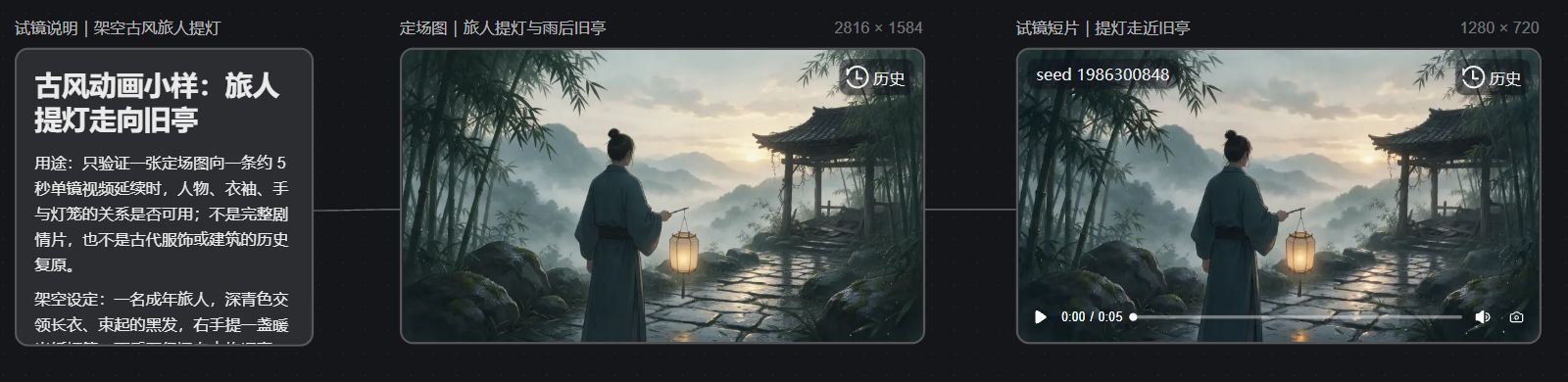
This sample is a fictional ancient-style exercise I constructed for the article, not a historical reconstruction, an existing film or TV work, or an officially released animation project. In the Nadou Pro case canvas, the three nodes "Screen Test Description → Keyframe → Short Film" are linked in dependency order. The text card documents delivery boundaries, shot actions, and acceptance points so an attractive opening frame is not substituted for dynamic checks.
The keyframe was generated by Seedream 5.0 Pro, actual size 2816×1584. The traveler wears a deep teal long garment, faces away from the camera, and holds a warm-glowing paper lantern with a thin rod and cord in the right hand; a stone path extends from the character's feet toward an old pavilion on the right, and bamboo shadows, light mist, and a blue-gray palette form the background. The image provides an initial visual reference for the character, props, and space, but fingers, the lantern handle, and sleeves still need to be checked in the video.
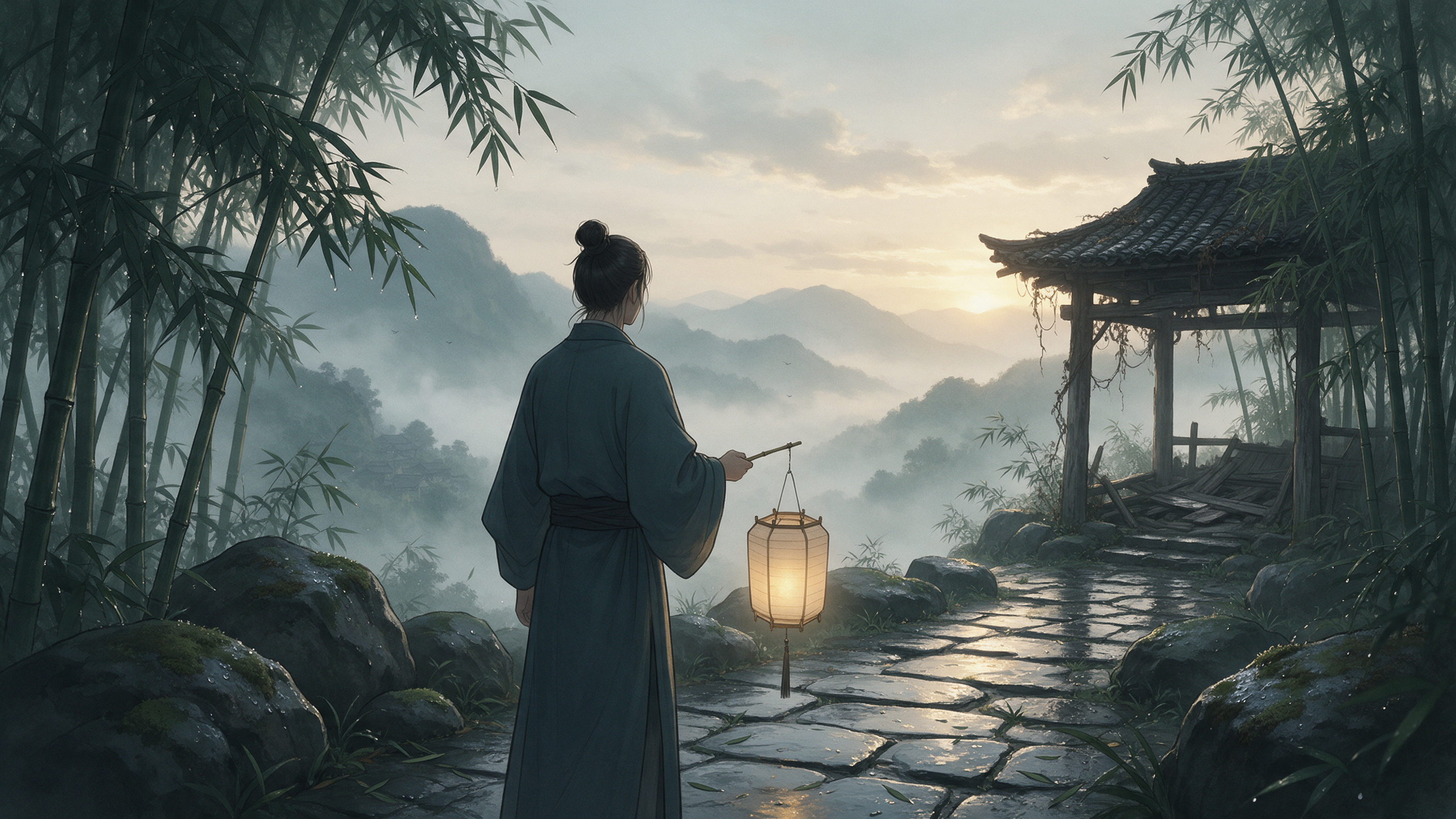
Using this image as the sole visual reference, I generated a single-shot short film with Seedance 2.0 Mini at 1280×720, approximately 5.04 seconds, with no audio. On web playback review, the character still wears the deep teal garment and the positional relationship between the paper lantern and the old pavilion is discernible; the image has slight motion. Local details such as the interaction between the lantern handle and fingers and sleeve intersections should be reviewed frame-by-frame during formal production, so it is not valid to claim the motion is completely stable based on this alone. This screen test helps determine whether short actions in the same scene have production value; it does not test a second camera angle, a pendant close-up, character facial reactions, dialogue, or a complete edit.
The panorama below is a screenshot taken from the real canvas web page used in this test, showing the description card, keyframe, video node, and the two connecting lines on the same screen to make it easy to verify that the assets were indeed produced in the order described above.
What else is needed to go from a single-shot screen test to a full sequence
First check motion: Frame-by-frame, check whether the right hand, lantern handle, lantern cord, and lantern remain connected; whether sleeves intersect the arm; and whether the character walks in the intended direction. If structural problems are found, fix the references or redo the corresponding shot rather than expecting color grading to fix it.
Next check shots: The originally conceived "discovering the pendant" still requires a tabletop close-up, the character's reaction, and shot transitions. This single shot only covers approaching the old pavilion and you cannot mark unproduced shots as completed. New shots should use the confirmed versions of character, scene, and props, and check that lighting, blocking, eyelines, and the pendant's position are consistent.
Finally, check the completed piece: With audio muted, first see whether the audience can understand the character's arrival, discovery of a clue, and reaction; then check dialogue, environmental sounds, music, subtitles, and rights clearance. This test video has no audio and is not fully edited. Historical subjects require separate source verification; fictional settings should be checked against the established art conventions for consistency.
When choosing software, using this shortest screen test for acceptance is more useful than comparing still samples alone: whether the art style can be consistently maintained, whether motion is legible, whether issues can be identified and fixed, and whether the final assets can be integrated into the team's existing editing and animation pipeline.